Turn Telegram into private, unlimited Android cloud storage
TeleVault - Telegram storage maps Telegram chats and Saved Messages into an Android vault, letting you back up and stream media directly from Telegram. The app, built by Govind S R, targets productivity-minded Android users who want a privacy-focused, self-managed backup alternative. Key functions include folder-style organization, smart visual search, AES-256 optional encryption, and an integrated scanner and media player. It suits users who accept a one-time technical setup to avoid recurring cloud subscriptions.
What TeleVault does and why it fits Telegram power users
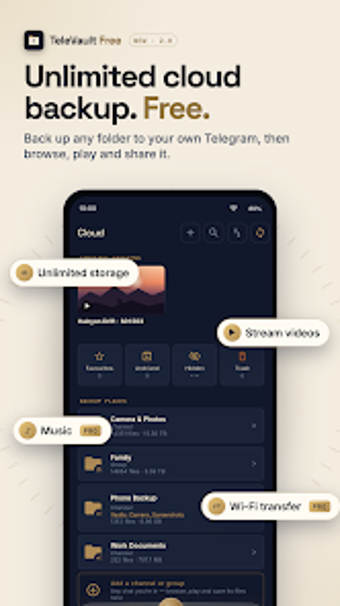
TeleVault uses Telegram's API to turn your account into a storage layer, so the app presents chats, Saved Messages, and private channels as folder-like galleries. The app supports all file formats and streams videos with a built-in player, which means professionals who keep large media collections can treat Telegram as an archive without moving files between services. The app's design focuses on storage-as-chat rather than replacing a conventional cloud provider.
How the core workflow handles backup, search, and playback
The core workflow indexes Telegram content into organised vaults, offers a visual smart search for photos, and plays media from the cloud without full downloads. It also includes a document scanner and contacts backup utility to capture business artifacts on mobile. Automatic background backups are listed as a Pro feature, so scheduled or change-detection backups depend on that upgrade to run without user intervention.
Setup, interface, and learning curve for workplace use
Setup requires a Telegram account and a one-time provision of Telegram API keys guided in-app, which adds an initial configuration step. The interface exposes folder views and galleries rather than raw chat logs, reducing manual sorting. Optional AES-256 end-to-end encryption encrypts files locally before upload, which raises the security bar but adds responsibility for maintaining a recovery passphrase.
Compatibility, performance, and storage trade-offs
Because TeleVault talks directly to Telegram, file compatibility follows Telegram's limits: single files up to 2GB (4GB with Telegram Premium). The app avoids third-party servers, so uploads rely on Telegram's storage capacity and transfer rates. For large archives the streaming player and search engine keep access practical, while the Pro tier enables background automation and higher transfer options.
Who should use TeleVault and who should consider alternatives
TeleVault suits Android users comfortable managing their own backups and accepting Telegram as the storage backbone; it rewards hands-on setup and local key management. It is not aimed at users who need a plug-and-play, fully managed cloud with vendor-hosted account recovery. For privacy-focused individuals who can handle the technical setup, TeleVault is a purposeful option that replaces recurring cloud dependence with an account-centred workflow.